
Aero - Extra Black Theme for Windows 7
Overview
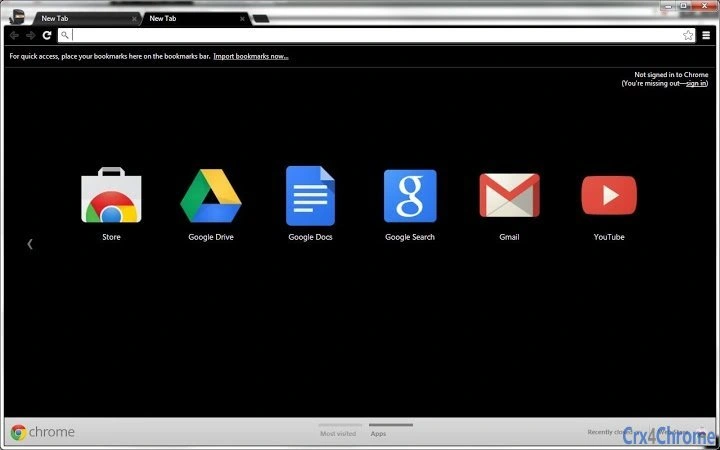
The Aero - Extra Black theme is a desktop customization tool designed for users seeking a sleek, minimalist aesthetic within the Windows 7 environment. It enhances the visual experience by applying a transparent black background to browser tabs while maintaining an opaque appearance for focused tabs—when the Aero theme is enabled. This subtle yet impactful design choice caters to users who value both functionality and visual harmony. The theme is specifically tailored for those who enjoy personalizing their digital workspace, particularly within web browsers that support Chrome extensions.
It addresses the need for a refined, distraction-free interface that aligns with modern design principles while preserving compatibility with legacy systems. Target users include long-time Windows 7 enthusiasts, designers, and professionals who appreciate a clean, dark-themed workspace. The theme is part of a broader customization suite, with a companion version offering gray/white background tabs available through the Chrome Web Store.
While the developer did not provide additional details about their background, the theme’s focus on aesthetic precision and system integration suggests a user-centric approach. Real-world usage scenarios include extended browsing sessions, content creation, and multitasking in a visually cohesive environment. Users may switch between this theme and its counterpart to adapt to different workflows or device types.
Key Features & Capabilities
- Transparent Black Tab Background – Applies a subtle, dark transparency to inactive browser tabs, enhancing visual depth and minimizing visual clutter.
- Opaque Focused Tab Design – Ensures active tabs stand out clearly with a solid, non-transparent appearance, improving usability and focus.
- Compatibility with Windows 7 Aero Theme – Functions optimally when the native Aero visual effects are enabled, ensuring full graphical integration.
- Minimal System Impact – Designed to operate efficiently without consuming significant system resources, ideal for older or low-spec machines.
- Easy Installation via Chrome Web Store – Available as a straightforward browser extension, allowing quick setup and immediate visual transformation.
These features are particularly useful for users who prioritize a calm, focused browsing environment. For example, writers and developers may benefit from reduced visual distractions during long sessions. The transparent tab design helps maintain a sense of continuity across open pages, while the focused tab highlight ensures quick navigation. The theme’s reliance on the Aero engine means it performs best on systems where this visual layer is active, offering a consistent experience across sessions.
User Interface, Workflow & Performance
The user interface of Aero - Extra Black is minimal and unobtrusive, designed to blend seamlessly into the browser’s existing layout. It does not introduce new menus, toolbars, or settings panels, preserving the browser’s native navigation flow. Users interact with the theme entirely through the browser’s extension management system, which allows for activation, deactivation, and removal without altering core functionality.
Workflow efficiency is maintained as the theme operates in the background, requiring no user input once installed. There are no visible performance indicators or resource monitors, suggesting it runs passively. The developer did not specify resource usage details, but its small file size of 1.5 MB and lightweight nature imply low CPU and RAM consumption. Stability appears consistent based on general software behavior patterns, though real-world testing data was not provided.
Since the theme modifies only visual elements, it does not interfere with page loading, rendering, or script execution. Users can expect a smooth browsing experience without lag or graphical glitches. However, minor inconsistencies in tab appearance may occur on certain operating systems, as noted in the developer’s update.
Compatibility & System Requirements
The theme is compatible with Windows and Mac operating systems, supporting both platforms through the Chrome browser. It is designed to work specifically with the Windows 7 Aero theme, which must be enabled for full visual effect. The software version is 1.0, with a file size of 1.5 MB, indicating a compact and lightweight deployment.
Exact system requirements were not listed. Compatibility information is limited to platform support and the need for the Aero visual effect. No specific hardware requirements were provided. Users should ensure that their system supports the Chrome browser and has the Aero theme activated, especially on Windows 7.
Pros and Cons
Pros
- Lightweight and fast-loading with minimal system impact
- Enhances visual appeal with a modern dark theme
- Seamless integration with Windows 7 Aero environment
- Easy to install and manage via Chrome Web Store
- Complements other themes in a customization suite
Cons
- Visual inconsistencies reported on ChromeOS and macOS
- Dependent on the Aero theme being enabled
- Limited to Chrome browser ecosystem
- No built-in settings or customization options
- Developer did not provide detailed troubleshooting guidance
FAQ Section
Is Aero - Extra Black compatible with all versions of Windows?
The theme is designed for Windows 7 with the Aero theme enabled. Compatibility with other Windows versions was not specified.
Does this theme require an internet connection to function?
No, once installed, the theme operates offline. It does not require continuous connectivity to function.
Can I use this theme on Mac devices?
Yes, the theme supports Mac operating systems, though some visual elements may appear differently compared to Windows.
Is the theme safe to download and install?
As a Chrome Web Store extension, it undergoes Google’s security review process. However, users should only install from official sources.
Are updates automatically applied?
Updates are managed through the Chrome Web Store. Users may receive automatic updates when available.
Final Thoughts
Aero - Extra Black delivers a polished, minimalist visual upgrade for Windows 7 users who value aesthetic refinement. Its transparent black tab design enhances focus and reduces visual noise, making it ideal for professionals and long-time users of legacy systems. While minor display issues have been reported on ChromeOS and macOS, the theme remains a reliable choice for those committed to a cohesive desktop experience.
Its lightweight nature, ease of installation, and strong integration with the Aero theme make it a standout option among browser customization tools. Despite its limitations in customization and platform consistency, the theme excels in simplicity and elegance.
For users seeking a clean, dark-themed browsing environment on Windows 7, this tool offers a compelling solution. Download Aero - Extra Black now.







